
Security
Overview
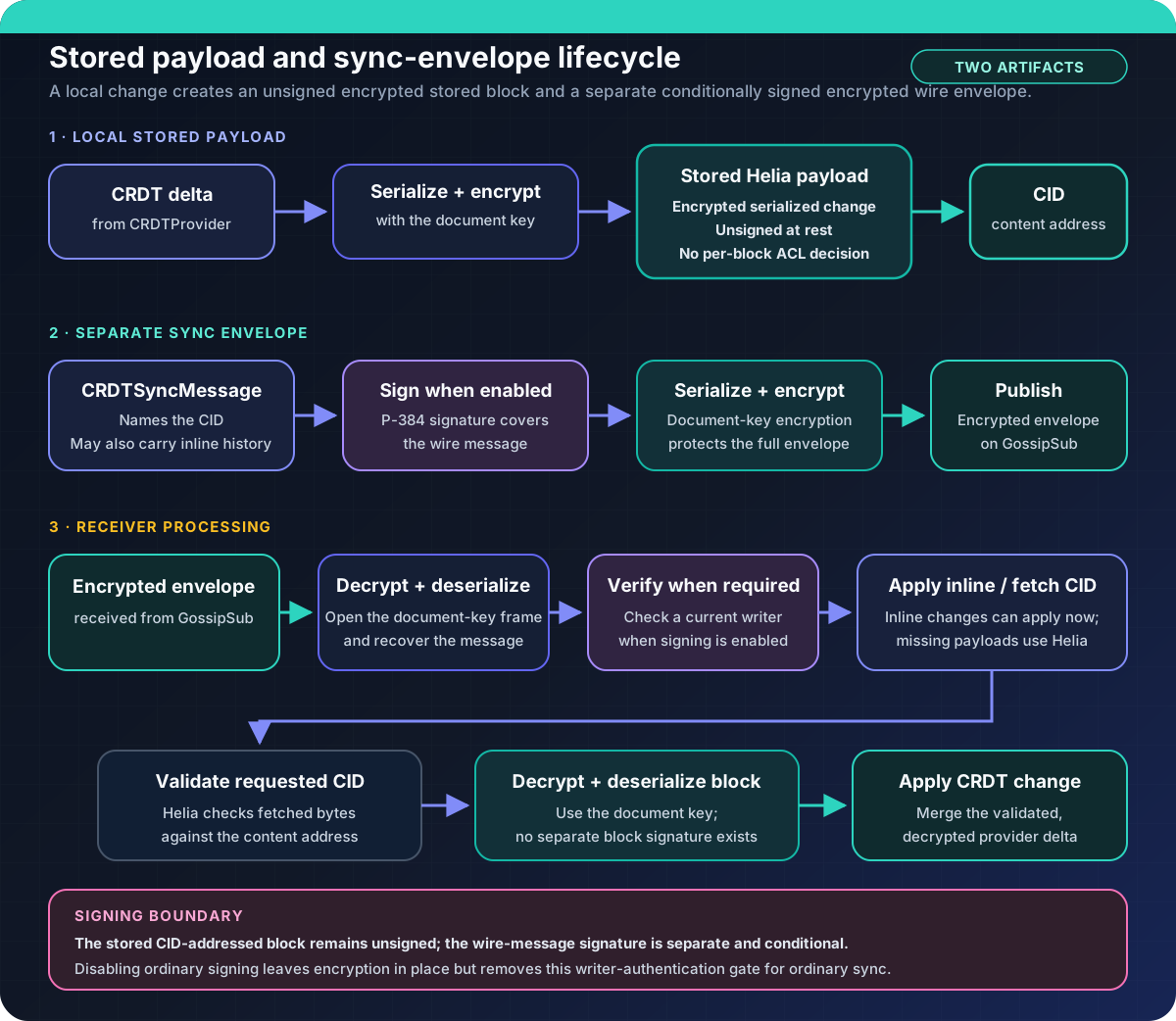
Section titled “Overview”Peerborne encrypts stored change payloads, ordinary GossipSub sync envelopes,
and load responses. With document signing enabled (the default), those outgoing
CRDTSyncMessage payloads are signed before their serialized envelopes are
encrypted; load requests also carry a signature. The separate CID-addressed
stored payload has no writer signature.
Relay and other infrastructure not given the document key handle ciphertext
rather than document plaintext; they never need a signing private key. During
normal post-load sync, once a trusted writer set exists, a peer without a
current writer key cannot produce an ordinary sync message that receivers
accept. A first load has no prior writer set for authenticating its selected
outer response and instead uses the narrower configured quorum/CID gates.
Identity and trust roots
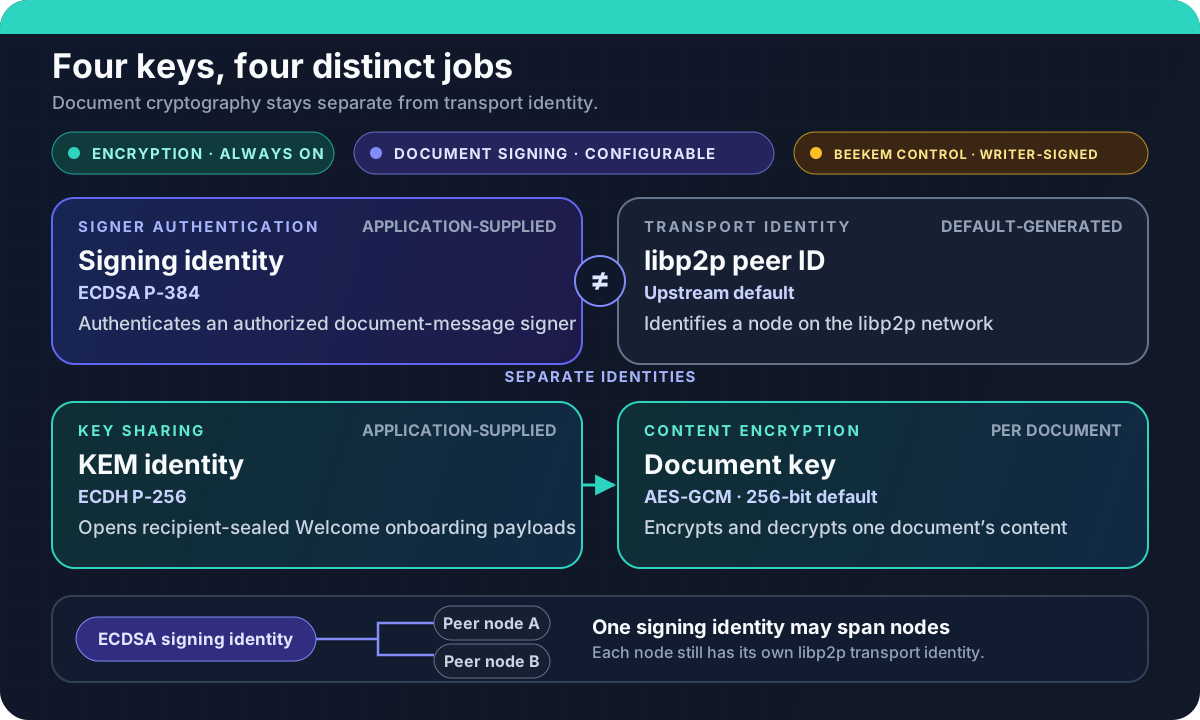
Section titled “Identity and trust roots”| Key | Algorithm | Purpose | Managed by |
|---|---|---|---|
| Signing key | ECDSA P-384 | Authenticates an authorized document-message signer | Application |
| KEM key | ECDH P-256 | Opens recipient-sealed Welcome onboarding payloads | Application |
| Document key | AES-GCM (256-bit; bundled document-key path) | Encrypts/decrypts document content | Peerborne (per-document) |
| libp2p peer ID | Upstream default | Identifies the node on the libp2p network | Generated by default; configurable |
Fit diagram to page
Evidence boundary. This diagram maps implemented key roles and documented configuration behavior; it does not imply that Peerborne provides application-key onboarding, recovery, or complete revocation workflows.
The signing key and KEM key are application-supplied. Peerborne does not generate, store, recover, or back up user keys — key management is entirely the application’s responsibility.
The libp2p peer ID is separate from the signing identity. This means:
- Changing the libp2p key (e.g., relay restart) does not change the document signing identity
- The same signing identity can be used across multiple libp2p nodes
- Applications can supply libp2p private-key configuration instead of using the generated upstream default
Signed invitations
Section titled “Signed invitations”The initial online invitation protocol binds three signed envelopes:
- The founder signs an expiring offer containing the document ID, requested role, issuer identity, and founder rendezvous addresses.
- The recipient signs a join request bound to the exact offer, their signing identity, and their raw P-256 KEM public key.
- The founder signs an acceptance bound to both earlier envelopes. Its BeeKEM Welcome is sealed to the recipient KEM key, and its initial document state is encrypted under the document key.
Accepting an invitation verifies every binding and the resulting ACL before opening the document. Failure never falls back to new-document creation. See Invite a collaborator for the API and its founder-plus-one, online-only trust boundary.
Before changing membership, the founder also performs a fail-closed capacity check. The bundled Automerge JSON providers and P-384/SHA-384 SubtleCrypto declare the one profile whose bounds Peerborne tests. It combines the retained sync tree, complete keychain, latest snapshot, tips, signature, projected ACL growth, encryption framing, and a 128 KiB reserve under the 1 MiB wire-field cap. A custom provider is rejected unless it deliberately implements the same capacity-profile attestation; doing so makes that provider responsible for preserving every declared bound. The exact sealed Welcome and encrypted bootstrap are checked again after construction.
An offer is still a bearer capability. Its self-signature does not identify a human or organization, and the first person who obtains the link can claim its role. Applications should deliver it through an authenticated private channel or separately verify the issuer fingerprint.
Implemented authorization
Section titled “Implemented authorization”Reader/writer ACL
Section titled “Reader/writer ACL”Each document has an access control list with two roles:
// Grant read access (the second argument is the reader's raw// SEC1-uncompressed P-256 ECDH public key bytes)await document.addReader(peerSigningPublicKey, readerKemPublicKeyBytes);
// Promote an existing explicit reader to write accessawait document.addWriter(peerSigningPublicKey);
Before calling addReader, a founder node must set its KEM key pair:
await document.setKemKeyPair(kemKeyPair);- Readers receive recipient-sealed keychain material through Welcome onboarding and decrypt content for epochs whose keys they hold.
addReader()requires the recipient’s KEM public key and rejects a call without it before changing the ACL. - Writers sign ordinary sync messages that carry new changes. The local
addWriter()API requires the target to have both an explicit reader row and a unique live BeeKEM leaf, so onboard it withaddReader(peerSigningPublicKey, readerKemPublicKeyBytes)before promotion. The identity-to-KEM binding is held in memory by the document instance that added the reader, so readers added before a restart cannot currently be promoted. During post-load sync, receivers verify the outer signature against their current writer list before applying the message when signing is enabled. - Local role changes share a document mutation queue.
removeReader()rejects an identity that is still a writer; demote it withremoveWriter()first.removeWriter(key, { requireRemainingWriter: true })rejects withLastWriterRemovalErrorwhen no other writer would remain; it checks inside that queue, but concurrent removals by other peers can still leave a document with no writers. Removing an identity with no reader row and no local KEM or leaf record also fails unless the live BeeKEM tree holds only the local leaf, because absent records cannot prove the identity was revoked. These checks do not make the two replicated ACLs globally atomic: independently received ACL changes can temporarily reflect different roles on different replicas. - Ordinary document sync signing is configurable. Initial loads, security advertisements, and BeeKEM Welcome and PathUpdate membership-control messages remain writer-authenticated even when
enableSigningisfalse.
Where the receiving operation verifies a sync-message signature, that
signature covers an exact signatureContext tag chosen by the operation. This
prevents a captured, valid body from being reused by a different same-shaped
authenticated handler after re-encryption. It does not prevent replay within
the same context, and an authorized writer can still intentionally sign a new
message for any operation its role permits.
The reader-row and live-leaf promotion checks above are local API guards. An incoming raw ACL delta is not yet checked against replicated identity/KEM transition records, so this is not an end-to-end membership invariant across replicas.
Current-writer authorization only
Section titled “Current-writer authorization only”When document signing is enabled, ordinary inbound sync envelopes are
authorized against that replica’s current writer ACL. Grants do not expire
automatically; they remain accepted until that replica applies a writer-removal
ACL update. With enableSigning: false, ordinary inbound sync skips this
writer-signature gate. The standalone ACLChain implementation is not wired
into this path. Authorization is consequently local and order-dependent: a
stale or partitioned writer can race a removal with a signed ACL re-grant while
another replica still considers that writer current. Beyond this gate, there is
no:
- Role-based access beyond reader/writer
- Delegation or sub-key authorization (UCAN capabilities exist but are not integrated)
- Rate limiting or abuse prevention
UCAN capabilities
Section titled “UCAN capabilities”UCAN (User Controlled Authorization Networks) helpers exist in @peerborne/core as a standalone module. They are not integrated into the document change path. The UCAN module can:
- Issue capability tokens delegating specific permissions
- Verify capability chains
- Encode delegation proofs
But the document change path does not check UCAN tokens. UCAN integration is a future capability.
The optional UCANACL
wrapper in @peerborne/core keeps capability metadata in process-local memory.
That metadata, including its revoked-key set, is neither replicated nor
enforced as shared revocation state; only the wrapped ACL’s ordinary membership
change can reach other replicas.
Encryption and history visibility
Section titled “Encryption and history visibility”Peerborne encrypts stored payloads and wire envelopes through the configured
auth provider. The bundled document providers generate or import 256-bit
AES-GCM document keys. The lower-level SubtleCrypto auth primitive also
supports AES-CTR and AES-CBC, but that primitive support is not a bundled
document-key path. Peers can decrypt content only when they hold the needed
epoch key.
historyVisibility controls which document-key epochs are supplied in some
load and Welcome responses. It does not remove or redact retained CRDT
operations, force a key rotation per operation, or guarantee that earlier
content is unavailable: one epoch key can decrypt multiple operations, and a
sync tree or snapshot can carry retained history. Treat current_only and
since_invited as key-distribution filters, not deletion or historical-content
confidentiality guarantees.
The initial invitation API therefore requires an explicit
historyVisibility = 'full_history' choice and rejects the other modes before
changing membership. Invitation recipients may receive retained operations for
values that were later changed or deleted.
Fit diagram to page
Ordinary document signing configuration
Section titled “Ordinary document signing configuration”Document signing is controlled by PeerborneConfig.enableSigning (default: true):
| Setting | Effect |
|---|---|
enableSigning: true (default) | Ordinary sync messages are signed with ECDSA P-384, then serialized and encrypted with the document key. Post-load receivers verify outer message signatures against current writers. |
enableSigning: false | Stored payloads and sync envelopes remain encrypted with the document key, but application-level signing and verification for ordinary sync messages and snapshots are bypassed. A peer able to decrypt the affected traffic can forge those messages. Signing-enabled receivers reject unsigned ordinary messages, so mixed settings do not provide bidirectional interoperability. Invitation creation and acceptance are rejected. |
Initial loads, security advertisements, and the BeeKEM Welcome and PathUpdate
membership-control protocols are a deliberate exception to that toggle. Load
and advertisement requests are always signed by the requester, and each
responder verifies them against its own current reader and writer ACLs. Load
responses and advertisements are always writer-signed, and the loader verifies
them against its captured trusted writer authorities. Welcome and PathUpdate
outer messages are always writer-signed, and receivers drop unsigned or
invalidly signed copies regardless of enableSigning. Welcome and PathUpdate
are not ordinary whole-message document-key envelopes. A Welcome ECIES-seals
its onboarding payload to the recipient’s KEM key. A PathUpdate instead
carries path secrets individually encrypted to the surviving BeeKEM subtrees.
Initial-load quorum
Section titled “Initial-load quorum”V4 loading requires a fresh signed request challenge, trusted writer identities,
and locally resolved control/group commitments. Configure
resolveLoadSecurityCommitments(documentPath) for every load, including the
first, and for serving. It supplies the current version, controlHead,
groupId, epoch, treeHash, and confirmedTranscriptHash; a responder
cannot provide its own trust root. Trusted writers come from the local writer
ACL; when it is empty, as on a first load,
resolveTrustedDocumentWriters(documentPath) must supply them. The runtime
compares this tuple but does not yet replay an MLS control log.
loadQuorumK bounds queried transport peers. loadQuorumQ requires that many
independent trusted signing authorities to agree on one complete response
manifest and security-state digest. One credential contributes only one vote,
even through multiple PeerIds. An explicit Q is never lowered when fewer peers
are available. Distinct compromised authorities can still collude; independent
trust configuration is essential.
loadQuorumEnabled: false permits one authenticated V4 response and retains
challenge, tuple, signature, and frontier checks. Unsigned loads are rejected.
A failed document.open() never creates a document. Use document.create()
only when the application has explicitly authorized founding that path.
Revocation
Section titled “Revocation”Writer revocation
Section titled “Writer revocation”When a writer is removed from the ACL:
- With document signing enabled, after a replica applies the update it invalidates its cached writer set and rejects subsequently verified ordinary sync envelopes signed only by the removed key
- There is no globally simultaneous cutover: a replica that has not applied the best-effort ACL update still evaluates against its older writer set, and an in-flight message is judged against the set current when that replica verifies it
- The causal ACL chain is not integrated, so a stale or partitioned writer can race the removal with a signed re-grant; writer revocation does not protect against a malicious writer equivocating across partitions
removeWriter()revokes write authorization, not BeeKEM reader membership; an identity that remains a reader retains its existing read access, whileremoveReader()separately attempts a BeeKEM key rotation- With
enableSigning: false, ordinary inbound sync does not enforce writer signatures, so removing an ACL entry is not an adversarial remote-writer revocation boundary - Past contributions remain in the document; stored payloads do not carry persistent per-block writer attribution
- There is no mechanism to retroactively remove those past contributions
await document.removeWriter(revokedPeerSigningPublicKey);Reader revocation
Section titled “Reader revocation”Reader revocation is more complex. Since readers hold the document key, simply removing them from the ACL does not prevent them from decrypting blocks they’ve already received.
What exists:
- BeeKEM key separation can generate new document keys that exclude a former member
- PathUpdate V2 carries writer-signed ratchet updates bound to the exact parent tree and next generation
- Both mechanisms are incomplete: BeeKEM rekey state is memory-only (lost on restart), and PathUpdate has no delivery guarantee
// Be aware: BeeKEM state is memory-onlyawait document.removeReader(revokedPeerSigningPublicKey);removeReader generates and distributes BeeKEM PathUpdates internally as part
of the operation. This key-rotation delivery is best-effort; an update may not
reach every surviving member. Receivers reject skipped generations, stale
updates, and updates from a different parent tree before committing an epoch,
so every member must apply transitions in order.
A surviving reader that misses the new epoch cannot recover it with an ordinary
load response, because that response is encrypted under the unknown current
epoch. Recovery requires a separate recipient-bound re-invitation or explicit
key-recovery flow; Peerborne does not automatically re-invite members or run
a key-recovery flow. A Welcome must carry a generation-bearing BeeKEM tree;
key-only Welcome payloads are rejected.
The bundled Yjs and Automerge providers compose the local reader-ACL removal,
epoch-key append, BeeKEM tree replacement, and identity-cache cleanup through
prevalidated commit claims. A publication failure after valid claims leaves
those live states on the old epoch for an explicit retry. This is not a
distributed transaction: GossipSub publication may already have reached
another replica before a local publication failure is observed, so retries and
later synchronization can still be required. A prepared ACL change or keychain
epoch without a claimCommit() method violates the provider contract and is
rejected before any claim is invoked. A claim method and its callable finalizer are trusted provider boundaries: if an
invoked claim throws, returns an asynchronous or malformed record, or its
finalizer violates the synchronous nonthrowing contract, core poisons the
document instance because it cannot prove that custom provider state remained
unchanged. Discard that instance before continuing.
Limitations of revocation
Section titled “Limitations of revocation”- No absolute guarantee. A revoked reader with a copy of the encrypted blocks and the old document key can still decrypt them offline.
- BeeKEM state is lost on restart. If the node restarts, it loses track of which keys have been invalidated.
- PathUpdate is not guaranteed. There is no acknowledgment or retry mechanism.
- ACL authorization is not causally chained. The standalone chain primitive is not connected to document sync, so concurrent stale-writer ACL operations remain order-dependent.
- Key reuse risk. If the application reuses KEM key pairs across documents, revoking access to one document may not fully revoke it from another.
Metadata and hostile infrastructure
Section titled “Metadata and hostile infrastructure”Relays and other infrastructure nodes can observe:
- Peer IDs and connection patterns
- Document topic IDs (derived from document IDs)
- Message timing, frequency, and size
- Network topology
This metadata may reveal:
- Which peers are collaborating on which documents
- When collaboration is happening (message frequency)
- The rough size of documents (encrypted block sizes)
- The network location of peers (IP addresses, relay selection)
Peerborne does not protect against traffic analysis or metadata leakage.
CI-backed evidence
Section titled “CI-backed evidence”Verified in CI:
- ECDSA P-384 signing and verification of sync-message payloads
- AES-GCM encryption and decryption of document blocks
- Current-replica reader/writer ACL checks at document boundaries
- BeeKEM key encapsulation and decapsulation
- UCAN capability issuance and verification (standalone module)
- Encrypted document retrieval through Circuit Relay
- Distinct-identity invitation acceptance and bidirectional post-join convergence through Circuit Relay
Not verified:
- Reader revocation with key rotation and live peer notification
- Causally authorized writer revocation across a partition
- Conflicting real peers serving adversarial shadow-tree payloads during quorum loading
- PathUpdate delivery across NAT boundaries
- Invitation or replay-state persistence across process restart
- Offline invitation acceptance or relay failover
- Resistance to Sybil attacks on quorum
- Key recovery or backup flows
Next steps
Section titled “Next steps”- Architecture — how encryption fits into the data flow
- Password manager cookbook — key sharing and ACL management example
- Limitations — complete security limitations